WhatsApp Group Management Tool: How to Manage Large WhatsApp Groups Efficiently
WhatsApp Group Management Tool: Everything You Need to Know
WhatsApp has become one of the world's most popular communication platforms, connecting billions of users daily. While it started as a personal messaging app, today it's an essential communication channel for businesses, schools, creators, NGOs, customer support teams, and online communities.
From announcing product launches to managing customer support and engaging members, WhatsApp groups have become the backbone of many organizations.
However, as your group grows from a few dozen members to hundreds—or even thousands—manual management quickly becomes overwhelming.
Admins spend countless hours answering the same questions, sharing repeated announcements, moderating conversations, and ensuring everyone stays informed.
That's where a WhatsApp Group Management Tool makes a significant difference.
Instead of manually handling every task, these tools help automate routine processes, improve communication, and make managing large WhatsApp groups far more efficient.
In this guide, we'll explore what a WhatsApp group management tool is, why businesses need one, the features to look for, and how tools like WhatsPilot help streamline group management.
What Is a WhatsApp Group Management Tool?
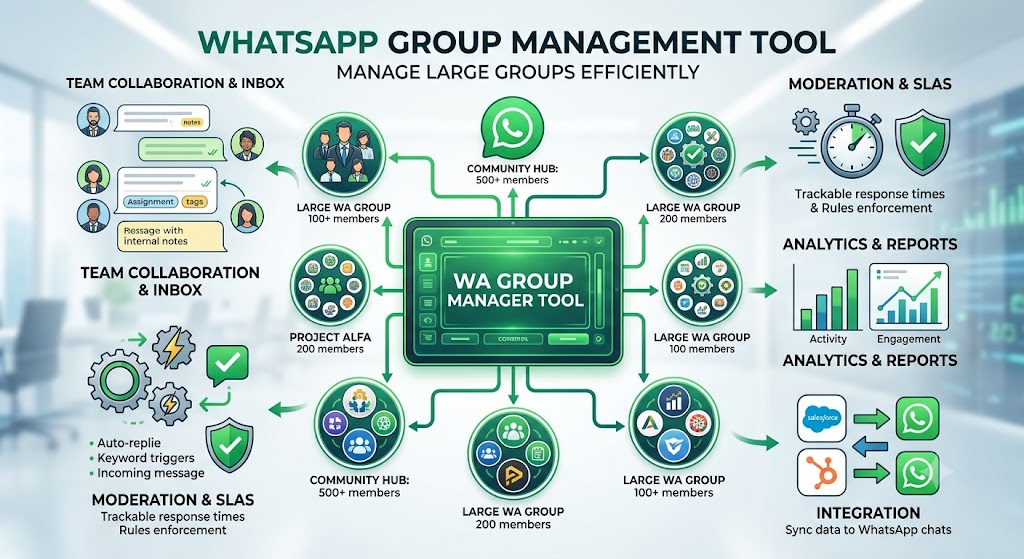
A WhatsApp Group Management Tool is software designed to help administrators organize, manage, and automate activities within WhatsApp groups.
Rather than relying only on WhatsApp's built-in features, these tools provide additional capabilities that make managing communities easier.
Common features include:
Automated welcome messages
Member onboarding
Scheduled announcements
Group moderation
Smart notifications
Shared admin access
Analytics and reporting
Automation workflows
Whether you're managing an internal company group, a customer support community, a coaching program, or a members-only network, these tools help reduce manual work while improving member engagement.
Why Managing Large WhatsApp Groups Becomes Difficult
Most WhatsApp groups work perfectly when they have 20 or 30 members.
But the experience changes dramatically once a group reaches several hundred members.
Here are some of the most common challenges administrators face.
1. Important Messages Get Lost
In active groups, conversations move quickly.
An announcement shared in the morning can disappear beneath hundreds of messages by lunchtime.
Members often miss:
Event updates
Meeting reminders
Important documents
Policy changes
Product announcements
This leads to confusion and repeated questions.
2. Admins Answer the Same Questions Every Day
Growing communities often ask similar questions:
How do I join?
Where can I find the resources?
When is the next session?
How do I contact support?
Where are previous announcements?
Manually responding to these questions consumes valuable time.
3. Member Management Becomes Time-Consuming
As communities expand, managing members manually becomes increasingly difficult.
Admins may need to:
Approve new members
Remove inactive users
Organize multiple groups
Manage permissions
Maintain community guidelines
Without proper tools, these repetitive tasks quickly become overwhelming.
4. Engagement Starts Declining
Large groups often become noisy.
When members receive too many irrelevant messages, they stop paying attention.
Over time, engagement drops and valuable discussions become harder to maintain.
Benefits of Using a WhatsApp Group Management Tool
A dedicated management solution helps solve many of these challenges.
Save Time Through Automation
Instead of performing repetitive tasks manually, automation can handle:
Welcome messages
FAQs
Member onboarding
Scheduled reminders
Routine announcements
This allows admins to focus on building stronger communities rather than managing daily operations.
Keep Communication Organized
Announcements remain structured instead of getting buried in conversations.
Members always know where to find important information.
Improve Member Experience
New members receive consistent onboarding.
Existing members receive timely updates.
Questions are answered faster.
Overall satisfaction improves significantly.
Scale Without Increasing Administrative Work
Whether your community has 100 members or 10,000 members, automation allows your team to manage growth without proportionally increasing workload.
Features to Look for in a WhatsApp Group Management Tool
Choosing the right tool depends on your community's needs.
Here are the most valuable features.
Automated Welcome Messages
Every new member should receive:
A personalized greeting
Community rules
Helpful resources
Frequently asked questions
Contact information
This creates a professional onboarding experience.
Scheduled Announcements
Instead of remembering to send updates manually, schedule announcements in advance.
Perfect for:
Weekly meetings
Product launches
Event reminders
Course updates
Holiday notices
Shared Team Management
Large organizations often have multiple administrators.
A centralized platform allows team members to collaborate without sharing personal WhatsApp accounts.
Analytics and Insights
Understanding your community helps improve engagement.
Useful metrics include:
Active members
Message volume
Response time
Community growth
Engagement trends
These insights help administrators make better decisions.
Automation Workflows
Automation can simplify repetitive processes such as:
Greeting new members
Sending follow-up messages
Routing customer inquiries
Delivering important updates
Managing recurring tasks
Who Can Benefit From a WhatsApp Group Management Tool?
Educational Institutions
Schools, coaching centers, and online educators can:
Share assignments
Schedule reminders
Send study materials
Manage student communities
Customer Support Teams
Support teams can:
Reduce repetitive responses
Organize conversations
Improve response times
Keep customers informed
Businesses
Companies use WhatsApp groups for:
Internal communication
Employee updates
Sales coordination
Project collaboration
Customer engagement
Communities and Membership Organizations
Associations, clubs, NGOs, and creator communities can:
Welcome new members
Share announcements
Coordinate events
Increase participation
Best Practices for Managing WhatsApp Groups
Even with the right software, good management practices matter.
Set Clear Community Rules
Members should understand:
What is allowed
What is discouraged
Expected behavior
Posting guidelines
Keep Announcements Separate
Avoid mixing important announcements with casual conversations whenever possible.
Automate Repetitive Tasks
If your team repeatedly performs the same actions, automation can usually handle them more efficiently.
Review Engagement Regularly
Monitor activity levels to understand what content resonates with your members.
Why Businesses Choose WhatsPilot
Managing WhatsApp groups manually works only for small communities.
As your audience grows, you need better tools to stay organized.
WhatsPilot is built to simplify WhatsApp group management by helping teams automate repetitive workflows, organize communication, and improve member engagement.
With WhatsPilot, you can:
Manage multiple WhatsApp groups from one platform
Automate routine communication
Keep announcements organized
Streamline community management
Save hours of administrative work
Improve collaboration across your team
Whether you're managing customer communities, educational groups, internal teams, or member organizations, WhatsPilot helps you focus on building relationships instead of handling repetitive administrative tasks.
Frequently Asked Questions
What is a WhatsApp Group Management Tool?
A WhatsApp Group Management Tool helps administrators automate, organize, and manage WhatsApp groups more efficiently through features such as automation, scheduling, analytics, and member management.
Why should businesses use one?
Businesses save time, improve communication, reduce manual work, and create better experiences for customers and employees.
Can I manage multiple WhatsApp groups?
Yes. Modern management platforms allow administrators to manage multiple groups from a centralized dashboard.
Is automation useful for WhatsApp communities?
Absolutely. Automation helps welcome new members, schedule announcements, answer common questions, and streamline routine administrative tasks.
Final Thoughts
WhatsApp groups are no longer just casual chat spaces—they've become powerful communication hubs for businesses, educators, support teams, and online communities.
But with growth comes complexity.
Manually managing hundreds or thousands of members is time-consuming and often leads to missed messages, repetitive work, and reduced engagement.
A dedicated WhatsApp Group Management Tool helps solve these challenges by automating repetitive tasks, organizing communication, and making it easier to scale your communities without increasing administrative overhead.
If you're looking to build stronger, more organized, and highly engaged WhatsApp communities, the right management platform can make all the difference.
Ready to simplify your WhatsApp group management? Explore WhatsPilot and discover how automation can help you save time, improve engagement, and manage your communities more efficiently.
WhatsPilot Editorial Team
Writing about WhatsApp automation, business communication, and customer engagement strategies.
View all articles →